
Frequently Asked Questions
These are the frequently asked questions regarding DriverFinder. Before contacting customer support, please read them over and be sure your question has not already been answered below. We thank you for your cooperation.
1. What is a Driver?
A driver (also known as a 'device driver' or 'software driver') is a piece of software that lets your operating system communicate with your hardware. Devices like keyboards, mice, speakers, and printers all use a software driver to interact with the operating system and other software applications.
When you purchase an operating system such Microsoft Windows XP, many device drivers are built into the operating system. However, if you buy a new type of hardware device that the operating system did not anticipate, you'll have to install a new device driver. A device driver essentially converts the more general input/output instructions of the operating system to messages that the device can understand.
2. Why Do I Need to Update Drivers?
Hardware device manufacturers release new drivers all the time. This is their way of (1) fixing a known issue with their product, (2) to improve the general performance of their devices, (3) to enhance stability issues on your computer, and (4) as a way to provide new product features to you to retain their edge in the market.
So if you think about, if you don't update to new drivers, you could be missing out on A LOT of features that you could be benefiting from right now.
3. What is DriverFinder?
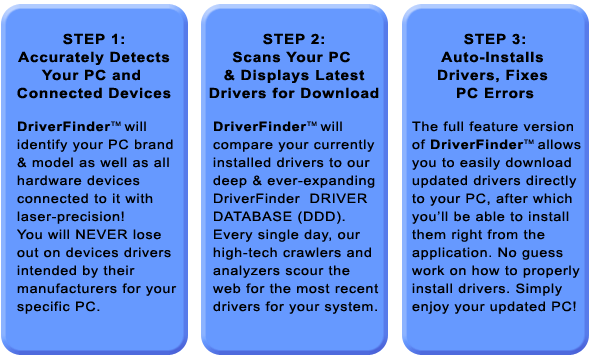
DriverFinder makes the tedious, hours-long task of identifying your current drivers and checking if there are new ones as easy as can be. It's a driver update utility that lets you find new drivers and install them on your system in just minutes using a few mouse clicks!
4. How Does DriverFinder Work?
5. How Do I Register for DriverFinder?
You can register for your own copy of DriverFinder by either clicking the "Activate" button (top-right), or the "Register" button in the lower right-hand side of the Main Window of the program. This will open a browser window that will bring you to the registration page.
6. How Long is My DriverFinder License Valid?
There are various licenses available for DriverFinder. You can opt for the 1-year or 2-year license. To get your own license now, please click here to register.
7. Can I Remove Unplugged Devices from My Computer?
The unplugged devices category in DriverFinder shows you the devices that were once connected to the computer,
but are not connected at the time of running the scan. In most cases these are USB devices, but they can be any type of device.
If they are devices that are still in use, it is best to connect them and update the drivers when updated drivers are available.
But if the devices are no longer used or the hardware is no longer present in the computer, the devices can be removed from the
Windows configuration, so that they do not show up in driver scans anymore.
Details on how to remove unplugged devices in Windows can be found on one of our support pages.
8. Can I remove DriverFinder from the PC startup?
Yes, simply open the application and click the Settings button in the left-hand panel. Next, clear the checkbox named "Start DriverFinder on login". Finally click the Save button and you're done!
9. Is DriverFinder compatible with Windows 10?
Yes, DriverFinder is compatible with Windows 10 from version 3.6.0 upwards.
The program will identify Windows 10 as the operating system and find the latest drivers for your computer that are compatible with Windows 10.
10. Do you offer a free trial?
We do not offer a free trial, but you can try DriverFinder risk-free for 30 days and get a full refund if you are not happy with it.